RC4 Reverse Engineering
RC4 Reverse Engineering
RC4 Overview
RC4 is a lightweight stream cipher commonly used in malware for string decryption, binary unpacking, and encrypting network traffic.
When analyzing a binary that uses RC4, there are a few key indicators and areas worth examining.
No matter how much obfuscation is applied, typically if you find two loops responsible for initializing and scrambling a substitution box, it’s a strong sign that RC4 is being used.
Furthermore, if the loops iterate approximately 256 times, it strongly suggests that RC4 is being used for encryption or decryption.
RC4 via SystemFunction032 - Reversing
SystemFunction032 is an internal Windows API function, part of the Native API exposed via Advapi32.dll. This function can be leveraged for symmetric encryption and decryption operations using the RC4 stream cipher, as its implementation internally supports that functionality.
In a binary analysis scenario where SystemFunction032 was observed decrypting a payload, no explicit RC4 looping logic appeared within the analyzed code. Instead, the function was dynamically resolved at runtime using LoadLibraryA to load Advapi32.dll, and GetProcAddress to retrieve the address of SystemFunction032.
The following image shows that happening:
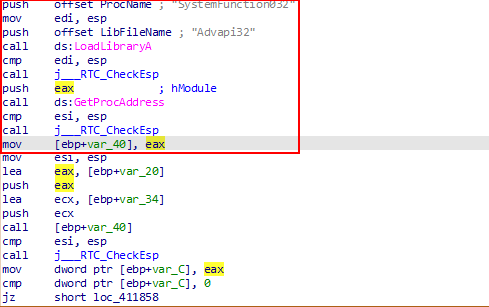
Disassembly Breakdown
push offset ProcName          ; Push the address of the string "SystemFunction032" onto the stack
push offset LibFileName       ; Push the address of the string "Advapi32" onto the stack
call ds:LoadLibraryA          ; Call LoadLibraryA("Advapi32") — loads the DLL and returns a handle in EAX
push eax                      ; Push the module handle (from LoadLibraryA) onto the stack
call ds:GetProcAddress        ; Call GetProcAddress(hModule, "SystemFunction032") — gets the function's address
The final instruction calls GetProcAddress, which retrieves the address of the SystemFunction032 function. This address is returned in the EAX register. Immediately after, the program moves this function pointer into a local stack variable (located at [ebp+var_40]), so it can be invoked later in the program:
mov [ebp+var_40], eax
Calling SystemFunction032
At this stage, the program needs to retrieve both the encryption key and the encrypted data in order to decrypt the payload. To properly understand how the function call is set up in assembly, it’s essential to know the signature of SystemFunction032.
According to the ReactOS source documentation (link), the function has the following signature:
NTSTATUS WINAPI SystemFunction032 (
    struct ustring* data,
    const struct ustring* key
)
This means the function expects:
- A pointer to a ustring struct representing the data to be decrypted.
- A pointer to a ustring struct representing the decryption key.
Both the data and key parameters passed to SystemFunction032 are constructed using the following ustring structure:
struct ustring {
	DWORD Length;
	DWORD MaximumLength;
	PUCHAR Buffer;
} _data, key;
How the Assembly Code Prepares the Arguments
In the assembly code, the program prepares the arguments by loading their addresses into registers and pushing them onto the stack in the correct order:
lea     eax, [ebp+var_20]
push    eax
lea     ecx, [ebp+var_34]
push    ecx
call    [ebp+var_40]
This can be observed in the image below:
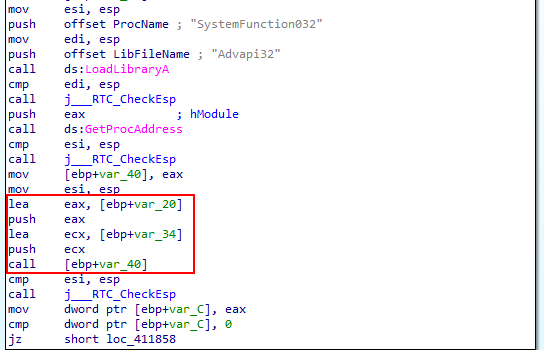
Explanation:
lea eax, [ebp+var_20]
- Loads the address of
[ebp+var_20]intoEAX. This variable will hold the key to be used for decryption.
push eax
- Pushes the key address onto the stack as the second argument.
lea ecx, [ebp+var_34]
- Loads the address of
[ebp+var_34]intoECX. This variable holds the encrypted data that needs to be decrypted.
push ecx
- Pushes the data address onto the stack as the first argument.
call [ebp+var_40]
- Calls the function pointer stored at
[ebp+var_40], which was previously loaded with the address ofSystemFunction032.
Note: On x86 calling conventions, the last parameter is pushed first.
Extracting the Key and the Encrypted data
Now that we understand how SystemFunction032 works and how the assembly code prepares its parameters, we can proceed to extract the decryption key and the encrypted data from memory.
At the instruction:
lea eax, [ebp+var_20]
You can inspect the value of the EAX register by hovering over it to view the contents at that memory location. The data at this address follows the expected layout of the ustring structure for the key parameter.
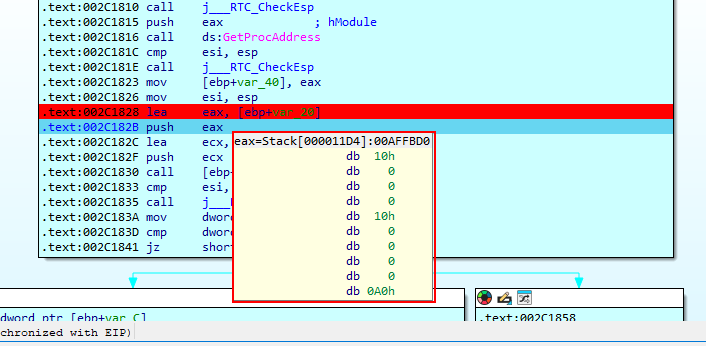
This data has 0x00000010 for the Length, and MaximumLength, which makes sense, since 0x00000010 in decimal is 256, which respects the Length, and MaximumLength for RC4.
By inspecting the value stored in the register at this point, we can also see the rest of the ustring structure. Most importantly, we’re interested in the Buffer field, which holds a pointer to the actual key data in memory.
This pointer allows us to navigate directly to the location where the key bytes are stored. From there, we can extract and analyze the decryption key used by SystemFunction032.
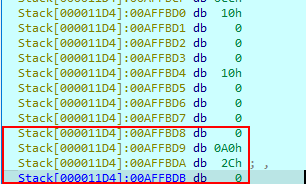
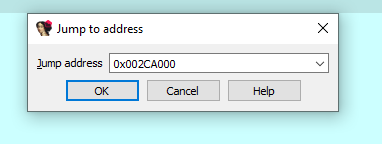
The key is stored at the memory address located at the 0x002CA000 offset. With this information, we can directly navigate to that address in IDA by using the G command and entering the specified offset.
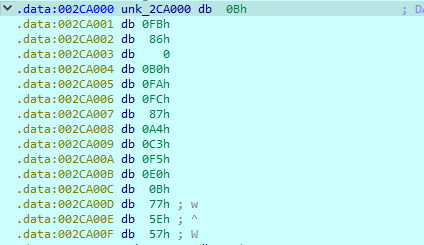
The key can be seen stored in the mentioned address.
At the instruction:
lea ecx, [ebp+var_34]
You can inspect the value of the ECX register by hovering over it to view the contents at that memory location. Like the key, the data at this address follows the expected layout of the ustring structure for the data parameter.
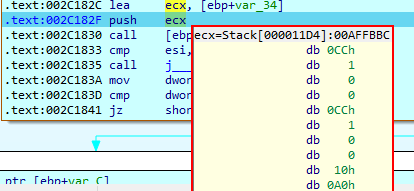
The data is stored at the memory address located at the 0x002CA010 offset.
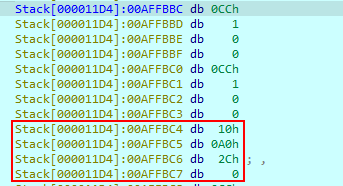
Again, by using the G command and entering the specified offset, we navigate to the specific location where the data is.
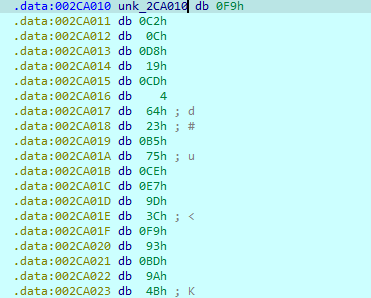
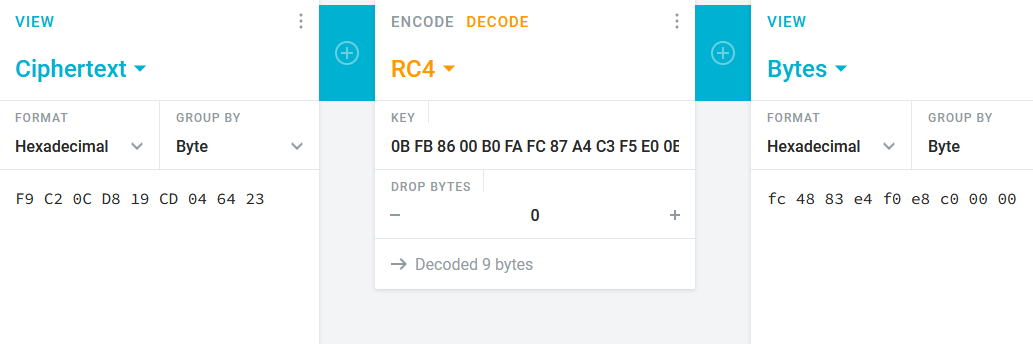
With the key and extracted data, we can now decrypt it. The decrypted output reveals a signature that matches the patterns of an MSFVenom payload.